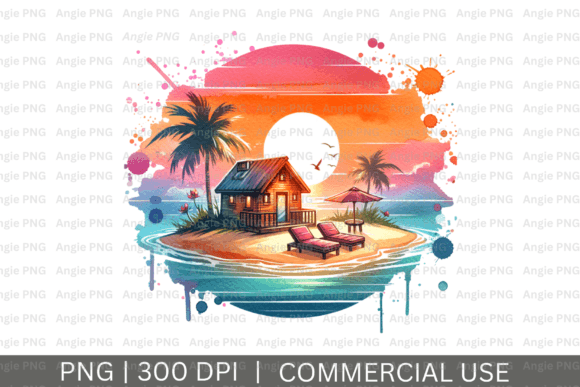
Watercolor Island Sunset PNG Clipart
A single well-chosen graphic can define an entire project. The Watercolor Island Sunset PNG Clipart offers a ready-made focal point, blending the emotional pull of a tropical sunset with the practical flexibility of a high-resolution digital asset. Whether you are designing for a client, building a brand, or working on a personal project, a piece like this saves hours of illustration time and brings immediate visual warmth.
This file is a digital product. What you download is an instant, printable PNG file ready to be imported into your workflow. There is no physical item shipped, which means you have full control over the final output. Understanding both the creative potential and the technical boundaries of this clipart is what allows you to use it effectively.
What the Watercolor Island Sunset PNG Clipart Actually Is
At its core, this is a raster graphic saved in the PNG format. A transparent background is one of its strongest features. Instead of fighting with a white or black box around your design, the transparent backdrop lets the watercolor sunset sit naturally on any surface you place it on. This makes it incredibly easy to overlay onto colored backgrounds, photographs, or textured paper.
The resolution is 300 DPI (dots per inch). This is the standard resolution for high-quality print work. Screen resolution is typically 72 DPI, so having a file at 300 DPI gives you the headroom to print it cleanly for items like greeting cards, art prints, or t-shirt transfers. You can also safely scale it down without losing any of the fine watercolor texture.
An important distinction: this is a PNG file, not an SVG. Unlike SVG files which use mathematical paths and are best for flat color graphics or logos, a PNG file is superior for watercolor designs because it preserves the subtle gradients, paint bleeding, and soft transitions that define the watercolor aesthetic. If you need clean, solid shapes, an SVG is better. For a painted sunset, a high-resolution PNG is exactly what is required.
Practical Applications Across Different Media
Knowing where to apply this type of graphic depends entirely on your audience and output medium. Here is how different creators can approach it.
Apparel and Textiles
For t-shirts, tote bags, and beach cover-ups, the Watercolor Island Sunset PNG Clipart is a strong candidate for sublimation printing. Sublimation requires a PNG with a transparent background and high DPI to transfer the ink onto polyester fabrics properly. The soft, blended edges of the watercolor style translate beautifully onto fabric because they avoid the harsh, rigid look that some flat vector graphics can have.
If you are using Direct-to-Film (DTF) transfers for cotton apparel, the transparent PNG allows you to cut precisely around the design. Position it on a pocket area for a subtle look, or center it large on the back of a hoodie. Pairing the sunset with a simple handwritten-style quote like “Island State of Mind” or “Pura Vida” creates a complete, marketable design without needing to illustrate from scratch.
Digital Content and Branding
For bloggers, social media managers, and content creators, this clipart can serve as a high-impact header or background element. The transparent background is perfect for layering text directly over the sky portion of the sunset. Because the file is 300 DPI and relatively large, you can resize it to fit widescreen blog headers or vertical Instagram stories without breaking the composition.
One practical approach is to use the sunset as an accent element in a brand kit. If your brand colors include warm tones like coral, ochre, or navy, the palette in this clipart can reinforce that visual identity. Drop it into a circle frame to use as a profile picture overlay, or use a blurred version of it as a subtle background texture for quote cards. It adds an aspirational, travel-inspired feel without requiring a stock photography license.
Home Decor and Printed Stationery
At 300 DPI, this file is perfectly suited for creating wall art. Printing it on matte paper and placing it in a simple frame can work well for a beach house or an office that needs a calming focal point. For invitations—whether for a luau, a retirement party, or a tropical-themed wedding—the watercolor sunset provides a sophisticated backdrop for event details. The soft wash of color is less rigid than a flat solid, giving the invitation a hand-painted feel.
For digital scrapbooking, a PNG with a transparent background is essential. You can layer photos, journaling cards, and embellishments on top of the sunset without locking masks or struggling with edge removal. This clipart essentially acts as a complete background paper design that you can resize and rotate to fit your 12x12 digital canvas.
Adapting the Clipart for Your Specific Audience
The same graphic can be used for very different audiences depending on how you contextualize it.
For the solopreneur or small business owner: You might use this in your email marketing to promote a summer sale or a new product line. The sunset imagery signals relaxation and escape, which pairs well with lifestyle brands. Keep the typography clean and modern to make the overall graphic look polished rather than casual. Pairing a script font with a simple sans-serif font creates a professional hierarchy.
For the hobbyist or crafter: You have more freedom to experiment. Use the clipart as a base for sublimation on ceramic coasters or glass cutting boards. Because the file is a PNG, you can easily upload it to a print-on-demand platler like Printful or Printify for mockups. If you are cutting physical elements with a Cricut or Silhouette, remember that PNGs are used for Print then Cut. You cannot use a PNG to cut layered vinyl by color (that is an SVG function), but you can print the full design on printable vinyl or sticker paper and then use the machine to cut around the shape.
For the educator or freelancer: Use it as a visual aid in presentations or course materials. A slide with a faded watercolor sunset background can keep an audience engaged better than a plain white slide. Because the DPI is high, the image will not look pixelated on a large projector screen.
Workflow Tips for Consistent, High-Quality Results
To get the most out of any digital PNG clipart, establishing a simple workflow helps maintain quality from download to final export.
When you first unzip the file, take a moment to rename it to something descriptive. Store it in a dedicated “Design Assets” folder so you can find it later. When you drag it into your editing software, check the image size. You can scale it down with no issues, but scaling it up significantly—say, by 200% or more—will begin to soften the distinct watercolor edges. If you need a massive banner print, use an AI upscaling tool designed for preserving raster details to increase your canvas size safely.
Color consistency is a common concern. Monitors display colors in the RGB spectrum, while most commercial printers use CMYK. The file you download is likely sRGB, which is standard for digital use. If you plan to print professionally, converting the file to a CMYK profile in Photoshop or Affinity Photo can help you preview how the vibrant oranges and yellows will translate to paper. Keep in mind that bright neon tones can sometimes print duller than they appear on screen.
Always test a small print or a digital mockup before committing to a large production run. Different paper stocks (matte vs. glossy) can also affect how the watercolor texture reads. Glossy paper tends to make the colors pop and the details sharp, while matte paper softens the image further, which can enhance the watercolor look.
Creative Direction and Composition
The power of a single clipart file is that it can anchor an entire composition. With the Watercolor Island Sunset PNG Clipart, you have a clear subject: a tranquil island silhouette against a glowing sunset sky. This built-in focus allows you to build around it efficiently.
Consider the rule of thirds. If the sun and horizon are located in a specific part of the frame, you have natural negative space elsewhere. This negative space is ideal for placing text or other design elements. You are not forced to work around a complicated subject; the simplicity of the silhouette is what makes it versatile.
Experiment with blending modes. If you place the PNG into a dark background, try switching the layer blend mode to “Screen” or “Lighten” to retain the highlights of the sunset while letting the background interact with the edges. You can also duplicate the layer, apply a heavy Gaussian blur, and use it to create a glowing aura effect behind a central focal point.
Pairing the clipart with other simple assets can create a richer scene. Adding a few tropical leaf silhouettes in the foreground or a subtle grid texture over the top can give the final piece a curated, editorial feel without overwhelming the original watercolor work.
Taking the time to explore these compositional options transforms a single PNG download into a foundational element for dozens of projects. The file itself is a tool, but your creative direction determines whether it becomes a subtle texture, a bold print, or a professional branding asset.