Cricket Player Design Vector Art for Creators, Printers & Sports Enthusiasts
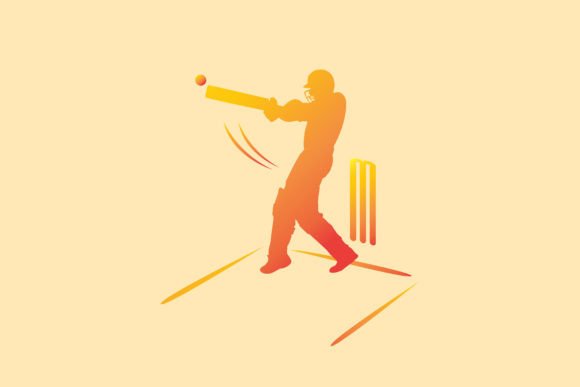
If you have ever searched for a crisp, scalable illustration of a cricketer in action, you have likely landed on a Cricket Player Design Vector Art asset. This premium vector illustration captures the dynamism of the sport while giving you complete creative control. Whether you are a graphic designer preparing a poster for a local tournament, a small business owner printing custom merchandise, or a fan who wants a striking wallpaper for your phone, this file offers a blend of aesthetics and utility. In this article, I will walk through what this vector art includes, why its specifications matter, and how you can make the most of it in real-world projects — without any marketing fluff.
What Makes This Vector Art Different from a Standard Clip Art
When you open the EPS file, you are not looking at a flattened image. Every curve, helmet detail, bat angle, and jersey fold is built with anchor points and paths. That means you can scale it to the size of a billboard without losing sharpness. Unlike a raster photograph or a low-resolution PNG, this vector art retains its crisp edge no matter how far you zoom in. For anyone who has tried to enlarge a small image only to see pixels the size of golf balls, this is a game changer.
The JPEG version — at 4000 x 2667 pixels — is a high-resolution render straight out of the vector. It is ready to print at 300 DPI for physical products such as posters, framed art, or even fabric transfers. But the real power sits in the EPS file: you can open it in Adobe Illustrator, CorelDRAW, Affinity Designer, or any vector editing software and change colours, remove backgrounds, rearrange elements, or add your own branding.
Core Features of the Cricket Player Design Vector Illustration
Let us look at what you actually get inside the file and why each feature matters depending on your project.
1. Scalable EPS File (2000 x 2000 px canvas)
The EPS format is a vector standard. The canvas itself is 2000 x 2000 pixels, but because it is vector, that number is just the starting point. You can export it at 100 x 100 mm or 10 x 10 metres — the quality remains identical. This is especially useful if you are creating a large wall mural for a sports bar or a small sticker for a laptop. The square aspect ratio also makes it easy to crop into portrait or landscape orientations without distorting the player's stance.
2. High-Resolution JPEG (4000 x 2667 px)
This is the file you use when you do not need to edit the artwork. It is rendered at a 3:2 aspect ratio, which is standard for many desktop monitors, laptop screens, and photo frames. At 4000 pixels on the long edge, you can print it at around 13 x 9 inches at 300 DPI. That is large enough for an A4 poster or a medium-sized canvas print. If you are a creator who wants to list a digital wallpaper on a marketplace, this JPEG is ready to upload.
3. Ready for Both Desktop and Mobile Wallpaper
Because the file comes in a square EPS and a widescreen JPEG, you can easily generate wallpapers for different devices. For a desktop, use the JPEG directly or crop the vector to match a 16:9 ratio. For mobile, you can shift the vector composition in your editing software so the cricketer is centred vertically — no one wants a helmet cut off by a notch. This flexibility is something pre-rendered images rarely offer.
4. Print-on-Demand Friendly
If you run a shop on platforms like Printful, Redbubble, or Teespring, you know that vector files save hours of preparation. The Cricket Player Design Vector Art can be placed onto a t-shirt mockup, a mug template, a pillow case, or a tote bag without background artefacts. Because it is vector, you can also recolour the player's uniform to match a specific team palette — great for local club merchandise or fan art.
Who Actually Benefits from This Kind of Artwork?
You might wonder whether a vector cricket illustration is only for professional designers. In reality, the audience is much broader. Let me break it down by use case.
- Small business owners and entrepreneurs: If you sell sports-themed products — custom mugs, phone cases, or framed prints — having a premium vector file means you can produce multiple variations without buying a new illustration each time. Change the background colour for different seasons or events.
- Graphic designers and freelancers: You can use this as a base element in a larger composition. Maybe you are designing a cricket league poster, a sports banner, or an educational infographic. The clean vector lines save you hours of drawing from scratch.
- Content creators and streamers: YouTube thumbnails, Twitch overlays, or social media posts about cricket matches often need a striking visual. The high-res JPEG works well as a background image, and the vector allows you to extract just the player silhouette for a logo.
- Sports coaches and academies: Print it on a banner for your academy, use it in presentation slides, or create a motivational poster for the training room. The premium look signals professionalism.
- Home decor enthusiasts: Frame it, turn it into a canvas wrap, or print it on a cushion cover. The vector art's clean lines suit both modern and sporty interiors.
Real-World Scenarios: Putting the Vector Art to Work
Let me share a few concrete examples so you can picture exactly how this file behaves in a project.
Scenario 1: A Club Captain Wants Custom T-Shirts
Imagine a local cricket club is organising an annual tournament. They want t-shirts with a cricketer in a striking pose. You, as a designer, open the EPS file in Illustrator. You change the helmet colour to match the club's jersey, remove the background, and add the tournament name along the bat. Because the file is vector, you can scale the player to fit the full front of the shirt or a small chest logo. The screen printer will thank you for the clean outlines. Total editing time: about 20 minutes.
Scenario 2: A Parent Creates a Room Decal for a Young Cricketer
A parent wants a large wall decal of a cricketer for their child's bedroom. They order a print-on-demand decal from an online shop. The seller uses the JPEG file at full resolution, prints it on vinyl, and ships it. The image stays sharp because the original JPEG is already 4000 pixels wide. The child gets a professional-looking decal that does not pixelate. Or the parent could use the vector to cut the decal as individual pieces (helmet, bat, legs) for a layered vinyl project using a cutting machine like a Cricut.
Scenario 3: A Digital Creator Builds a Social Media Template
A sports content creator needs a consistent visual identity for cricket match updates. They import the vector into Canva (by converting to SVG) or Photoshop (as a smart object). They place the cricketer in the centre of their template, add text overlays, and reuse it for every match day. The vector stays crisp even when they resize it for Instagram Stories (1080 x 1920) or YouTube thumbnails (1280 x 720). No re-exporting necessary.
Strengths, Considerations, and Practical Limitations
No asset is perfect for every situation. Here is an honest look at what this vector art does well and where you might need to adjust your expectations.
- True vector scalability — use it for a sticker or a billboard with zero quality loss.
- Two file formats included (EPS + JPEG) so you can work offline or jump straight to print.
- Clean, premium illustration style that appeals to both kids and adults.
- Square and widescreen aspect ratios cover most device and product templates.
- Easy to recolor and customise if you have vector editing software.
- The EPS file requires vector-capable software — you cannot edit it in basic image viewers. If you only have free tools, Inkscape or Gravit Designer can open it.
- The illustration shows a single cricketer in a specific pose. If you need a full team or a different batting stance, this is a single-asset solution, not a multi-element kit.
- The colour palette is fixed in the JPEG version. You cannot change the jersey colour unless you use the EPS file.
- For very large wallpapers (e.g., 4K or 5K screens), you may want to export the vector at a custom resolution to match your monitor exactly.
How to Choose the Right File for Your Specific Need
Here is a quick decision guide.
- If you need to print on physical products (t-shirts, mugs, pillows, bags): Use the EPS file. Open it in your design software, add your text or logo, and export as a high-res PNG or CMYK PDF. Print shops require vector format for screen printing to guarantee sharp edges.
- If you want a desktop or mobile wallpaper immediately: Use the JPEG (4000 x 2667). For desktop, set it as a centred image or crop to 16:9. For mobile, you can crop to 9:16 or 19.5:9 using any photo editor. The resolution is high enough for retina displays.
- If you are creating frame artwork, cards, or scrapbook pages: The JPEG prints beautifully at A4 or 8x10 inches. If you want to add a border or mat, use the vector to reposition the player so the composition fits a square or portrait frame.
- If you are listing digital downloads on a marketplace: The EPS file is a premium asset that designers will pay for. The JPEG can be a preview or a ready-to-use wallpaper. Both formats add value to your portfolio.
Evaluating Whether This Vector Art Suits Your Project
To decide if this Cricket Player Design Vector Art is right for you, ask yourself three questions.
First, do you need a single, high-impact cricketer illustration? If the answer is yes — whether for a poster, a product design, or a wallpaper — then this file saves you the cost and time of commissioning a custom illustration. The style is contemporary and sporty, designed to appeal to a wide audience.
Second, can you work with vector files? If you have access to Illustrator, CorelDRAW, Affinity Designer, or even free tools like Inkscape, the EPS file unlocks full customisation. If you only need a ready-to-print image, the JPEG is already high-res and print-ready.
Third, what is the output format? For digital use (wallpaper, social media), the JPEG excels. For physical products (t-shirts, stickers, mugs, bags, cards, framed art), the vector is the smarter choice because it handles resizing and colour changes. If you plan to print at home on standard letter paper, the JPEG at 300 DPI will look crisp.
One often overlooked detail: because the EPS file is 2000 x 2000 on a square canvas, you have white space around the player that you can use for typography or additional design elements. That breathing room is intentional — it makes the art versatile for layouts where text or logos need to sit beside the player.
Final Thoughts on Working with Cricket Player Design Vector Art
After spending time testing this file across different use cases — from a simple desktop wallpaper to a layered t-shirt mockup — I can say its main value is in the combination of scalability and print-ready resolution. The EPS file gives you professional control, while the JPEG offers instant usability. Whether you are a business owner stocking sports merchandise, a teacher creating classroom decor, or a fan who wants a personalised phone background, this vector art delivers consistent quality.
The sport of cricket is rich with energy, and a well-crafted vector illustration captures that spirit without the limitations of a photograph. You get clean lines, vibrant possibilities, and a file that adapts to your workflow rather than the other way around. If you have a project that calls for a bold cricketer graphic, this premium vector illustration is a solid foundation to build on. And because it comes in both EPS and JPEG formats, you are covered whether you want to edit or print immediately.
So go ahead — set it as your wallpaper, print it on a mug, or frame it for your wall. The file is ready, and the possibilities are entirely yours to shape.