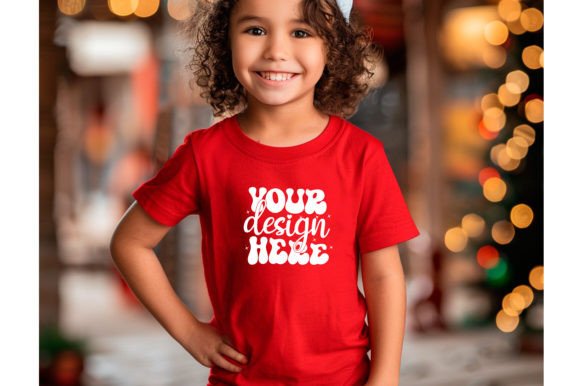
Christmas Cute Baby T-Shirt Mockup
If you sell custom baby apparel during the holiday season, you already know how much a great presentation matters. The right mockup can mean the difference between a casual browser and someone who actually hits “add to cart.” That’s where the Christmas Cute Baby T-Shirt Mockup comes into play. It’s a ready-to-use digital file that lets you drop your design onto a baby t-shirt image, so you can show customers exactly what they’re getting. No need to photograph a real shirt, no messy iron-on tests, no waiting for good lighting. You just open the file, place your artwork, and you’re done. It’s simple, fast, and surprisingly effective.
What it actually is (and isn’t)
Let’s clear that up right away. The Christmas Cute Baby T-Shirt Mockup is a high-resolution JPEG image, delivered at 300 DPI, inside a single zipped folder. The image you receive is completely blank—no logos, no watermarks, no distracting text. It’s just a clean, well-lit baby t-shirt, ready for you to layer your own design on top. You can use it to showcase illustrations, SVG cut files, watercolor art, hand-drawn lettering, or any other graphic you create. The mockup itself is not a physical product. Nothing gets shipped. No fabric, no packaging, no inventory. It’s purely a visual tool, but one that can make your shop look polished and professional without any photography skills.
Who actually needs this?
More people than you might think. If you run a print-on-demand store on Etsy, Shopify, or Amazon, this mockup is basically a shortcut to better listings. Instead of ordering a sample, waiting for it to arrive, photographing it, and hoping the lighting works out, you can mock up ten designs in an afternoon. That alone saves days of turnaround time. But it’s not just for POD sellers. SVG creators who sell cutting files on Creative Market or Design Bundles can use it to show how their designs would look on a real garment. Watercolor artists who sell digital prints can do the same. Even illustrators who design for licensing can use it to present concepts to potential licensees in a clean, realistic way.
Holiday rush preparation
Picture this: It’s mid-November. Holiday shopping is in full swing. Customers are searching for “cute Christmas baby onesie” or “first Christmas shirt for baby.” You have a great design ready, but your listing still shows a flat mockup with a plain white background. It gets clicks, but not as many conversions as you’d like. Now imagine swapping that flat image for the Christmas Cute Baby T-Shirt Mockup. Suddenly your design looks like it’s on a real shirt. The fabric folds, the soft lighting, the natural drape—all of it makes the product feel tangible. People can picture their own baby wearing it. That mental image is what drives the purchase.
Social media teasers
Maybe you’re building anticipation for a holiday collection. You can use the mockup to post a sneak peek on Instagram or Pinterest. Because the file is high-res and clean, it looks great on both mobile screens and desktop feeds. You can crop it, add text overlays, or just let the shirt speak for itself. Since the mockup is logo-free, there’s nothing competing with your design. That makes it especially useful for building a cohesive brand look across your social channels.
Client presentations for custom work
If you take custom orders—say a parent wants a personalized Christmas shirt with their child’s name—you can use the mockup to show them a proof before they commit. Instead of describing what it will look like, you send them a visual. That builds trust and reduces the chance of misunderstandings. Because the mockup is blank and ready for your design, you can add the custom text or illustration in minutes, send a preview, and adjust as needed. No need to photograph a physical shirt each time.
Different users, different benefits
The beauty of this mockup is that it adapts to how you work. Let’s look at a few specific user types:
- Print-on-demand sellers benefit most from speed. You can mock up multiple designs in one session and update your entire holiday catalog in a few hours. Since the file is 300 DPI, it prints cleanly at any size, so your listing images stay sharp even when zoomed in.
- SVG creators use it to show context. Instead of selling a flat vector file, you show it on a shirt. That adds perceived value. Buyers can see exactly how the cut file will look when applied to fabric, which makes them more confident in their purchase.
- Watercolor artists love how the mockup handles soft edges and gradients. A watercolor Christmas tree or snowflake that might look washed out on a white background looks vibrant on the shirt mockup because of the subtle shadows and fabric texture.
- Illustrators can use it for portfolio pieces. If you’re applying for freelance work with a children’s apparel brand, presenting your art on a realistic mockup shows you understand how your designs translate to products.
Practical things to keep in mind
Before you start designing, there are a few things worth knowing. Because the file is a JPEG, it works best with overlay techniques. Most people open it in Photoshop or Canva, add their design on a new layer, and use a blend mode like “Multiply” to make the design look like it’s printed on the fabric. If you’re not familiar with that workflow, a quick YouTube search will walk you through it in under two minutes.
The mockup comes as a single zipped file. That means you need to unzip it before you can use it. If you’re on a phone or tablet, you might need a file manager app that supports zip extraction. On a desktop, it’s usually as simple as right-clicking and selecting “Extract.” Once you do, you’ll have one JPEG image, ready to go.
One thing to note: because this is a stock mockup, it shows a generic baby t-shirt. That’s actually a strength for most sellers, because it works with almost any design style. But if your brand uses a very specific shirt cut or color, you might want to look for a mockup that matches exactly. For general holiday use, though, this one covers a lot of ground.
Strengths that stand out
The biggest strength is the time savings. You don’t need a photo studio, a model, or even a real shirt. You just need your design and a few minutes. The high resolution means you can use the same image for both your product listing and your social media ads without losing quality. And since it’s logo-free, you can use it on any platform, with any branding, without worrying about attribution or licensing conflicts.
Another strength is consistency. When every product in your shop uses the same mockup style, your store looks curated and professional. Customers notice that. It builds trust and makes your brand feel established, even if you’re just starting out.
A few honest limitations
No mockup is perfect, and this one has its limits. Because it’s a JPEG, you can’t adjust the shirt color or the background easily. If your design works best on a red shirt and the mockup shows a white one, you’ll need to either change your design or find a different mockup. Also, the mockup shows a single shirt. If you want to show front and back views, or a set of multiple items, you’d need additional mockups.
Another thing: the mockup doesn’t include any design elements. That’s by design—it’s blank so you can add your own—but if you’re looking for inspiration, you’ll need to bring your own creativity. That’s fine if you already have a design in mind, but if you’re hoping the mockup will spark ideas, you might want to browse some holiday-themed SVG bundles or watercolor packs first.
How to get the most out of it
Try using the mockup across multiple channels. Upload it to your Etsy listing as the main image. Use a cropped version for your Pinterest pin. Post a side-by-side on Instagram showing the flat design next to the mockup version. The more places people see your design in a realistic context, the more likely they are to buy.
If you sell on multiple platforms, keep a master folder with your mockup files organized by season. That way, when Christmas rolls around next year, you’re not searching through old downloads. Just open the folder, drop in your new design, and you’re live in minutes.
For SVG sellers specifically, consider bundling the mockup with your cut file as a bonus. Buyers appreciate seeing how the finished product will look, and a mockup adds perceived value without costing you anything extra.
Watercolor artists should pay attention to how their art interacts with the fabric texture. Sometimes a design that looks perfect on a flat digital canvas needs a slight opacity adjustment to feel natural on the shirt. Test a few variations before settling on the final image.
At the end of the day, the Christmas Cute Baby T-Shirt Mockup is a tool that lets your work speak for itself. It removes the friction of photography, saves you time, and gives your customers a clear picture of what they’re buying. Whether you’re a seasoned seller or just launching your first holiday collection, it’s one of those small investments that can make a big difference in how your products are perceived. And during the holiday season, when every sale counts, that kind of clarity is worth a lot.